




Try this with a concert album. Put the last few seconds of one song on and listen through the change to the next track. A cymbal can carry across the boundary, or the crowd can still be making the same noise on both sides. You’re listening for a brief drop to silence, right at the moment the number changes. The reason to use a familiar record is that you already know which bit of sound should be there.
Daft Punk’s Alive 2007 gives you a concrete pair to queue. The official track list opens with “Robot Rock/Oh Yeah” and follows it with “Touch It/Technologic.” They come from the same Paris show. Listen to the edition you have. The list can tell you what comes next, while any edits and pauses are in the recording itself.
Listen with transitions off
A gapless player makes a clean join. It finishes one file and plays the beginning of the next without a wait in the middle. It can play silence just as faithfully as it plays music, so gaps baked into a track stay put. Crossfade is different. If you choose a five-second crossfade, you’re asking the player to overlap the ends instead of keeping that join intact. This is useful for a playlist where two songs were recorded apart. It can make a mess of the timing in a continuous concert.
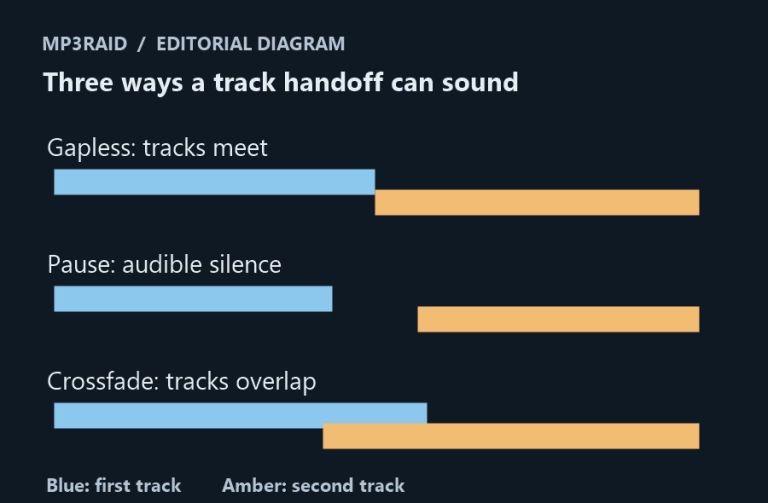
On an Apple device with the current Song Transitions options, you can switch the feature off. Crossfade uses a set length, while AutoMix makes dynamic transitions for supported subscription tracks. Start the same cue again with those effects out of the way. Let the player reach the end of the song rather than pressing Next. You want to hear the automatic changeover both times.
The same files on another player
Put those two files in a different player without changing your headphones or speakers. foobar2000 lists gapless playback among its features. If the hole in the sound goes away, you’ve kept the recording and the output the same, which makes the original player or its settings worth a look. You can make the same kind of comparison with a wired output and another output, once you keep the player fixed.
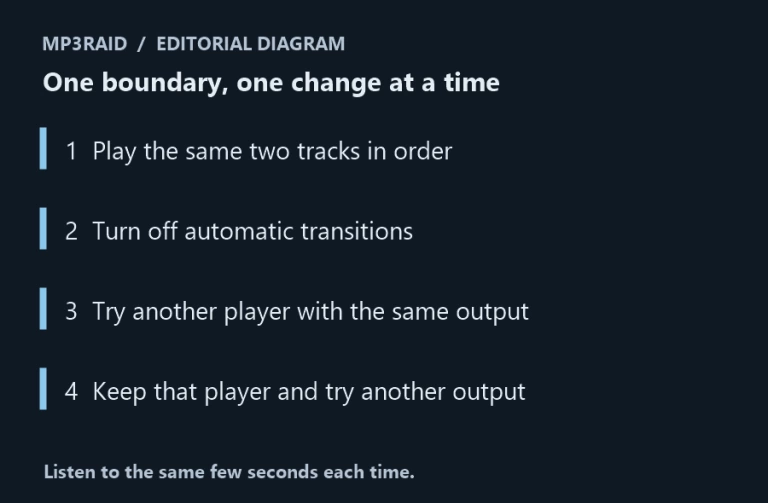
Don’t try to settle the question with two different editions. A later release may change where a spoken introduction ends or insert a bonus track. A pair of songs that look like the same release in two libraries can have different endings. Make sure the comparison starts with the same tracks in the same order.
Can you hear the silence in the file on its own?
The import command in Audacity’s manual is File → Import → Audio. If you have the first track as a local file, bring it in and look at its last few moments. Play that small section on its own. If you can hear the room fall quiet before the file even reaches its end, you’ve found audio that your music player can preserve. A flat-looking waveform at album-wide zoom is weaker evidence because quiet audio can look small on that scale.
Converting the file to FLAC won’t take that tail off. Xiph’s explanation of lossless encoding describes the same samples coming back after decoding. Try the playback comparison before converting an entire library. If the problem turns out to be a click at the edit, MP3Raid’s audio guides cover that separately.