



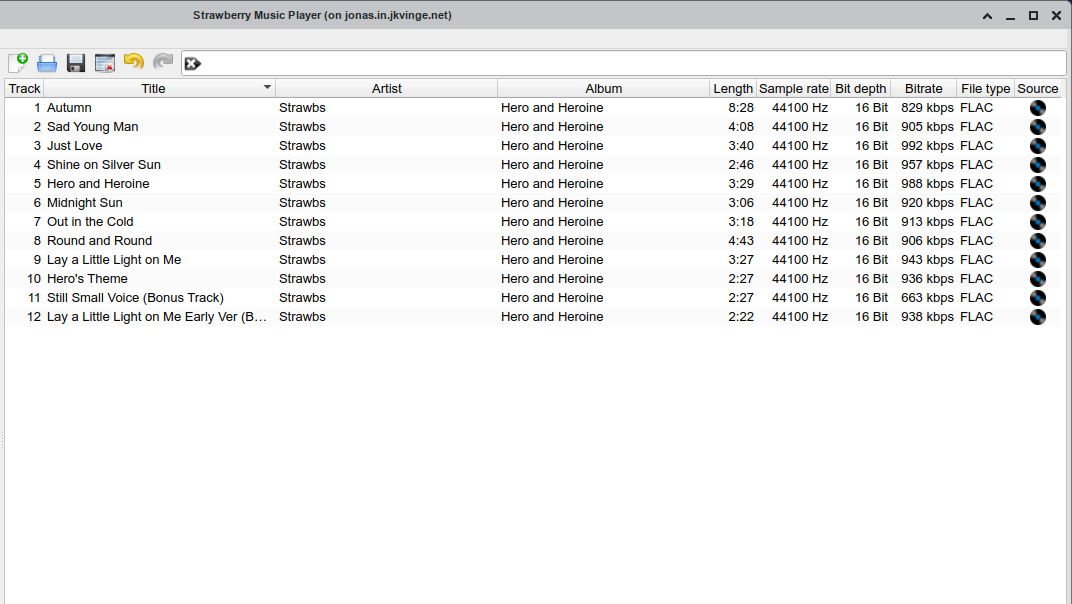
Before pointing Strawberry at your whole music library, choose one folder you can afford to experiment with. A copied album is enough to begin. You want to find out whether this player fits the files and computer you already have, before spending an afternoon reorganising everything around it.
Strawberry combines a local collection, playlists and tag editing. The project website also lists internet radio and Subsonic-compatible servers. For a listener with a drive full of music, that combination is useful: the same application can organise the files and play them. Our assessment here comes from the project's documentation. We haven't run a hands-on playback test.
The download decision comes first
Windows and Mac users should pause at the download section. When checked on October 18, it said current releases for those platforms were available to sponsors, with a US$7 monthly sponsorship required for new subscribers. The public source code remains available under the GPL.
Those two facts can coexist. Free-software licensing gives users freedoms over the code; it doesn't oblige the developer to supply every compiled installer at no charge. If you want an application you can download and open immediately, the sponsor requirement belongs in your decision from the start.
Linux users have a different route. Strawberry says it is packaged by many distributions. Check your distribution's package and version before following instructions meant for another system. Compiling it yourself is possible, but the repository lists a substantial set of build dependencies. That route suits someone prepared to maintain a build environment.
Two more platform details are easy to miss: the website excludes Windows from audio-CD and device-transfer support, and limits iPod support to older models. Someone buying into Strawberry mainly to play CDs on Windows would therefore be choosing it for a job the project says it doesn't support there.
Give the trial three small jobs
Once you've settled how to obtain it, use copies of files for the first pass. Keep the originals backed up. Try these three jobs before importing everything:
- Play a complete album in order. Pick files you know are valid, then check the order presented in the collection. A folder name and an album tag are different pieces of information; a neatly named folder can still contain untidy tags.
- Inspect a compilation. Look at how the collection groups songs with different performers. If artist and album information needs work, clean it up on the copies first. Our Picard guide explains the tagging side of that job.
- Save a short playlist and reopen it. Confirm that it still finds the files you selected. A playlist is a set of references and an order, so keep the music in a stable location while trying it out.
These are suggested checks for your own installation, not results from an MP3Raid test. They give a migration decision something concrete to rest on: your albums, your tags and your saved selections.
Keep the different music sources straight
A local FLAC or MP3, a radio stream and a track served from your own Subsonic-compatible library arrive by different routes. Strawberry supports all of those categories, but a radio stream still needs a connection. Subscription-app downloads need a separate check: as our offline-files guide explains, they aren't generally portable music files you can import into another player.
For local playback errors, start small too. The FAQ says a GStreamer missing-plugin message has several possible causes, including a missing plugin, an unsupported format or an invalid audio file. Try a known-good track before deciding the entire collection needs conversion.
The repository's service integrations are explicitly described as unofficial. Keep that qualification with the feature. For this decision, the strongest starting point is the collection of files you can manage yourself. If the small trial works, expand it one folder at a time.